
In yesterday’s blog I revealed that I can “convert” PNG files to TIFF files just by changing their suffix in the operating system. In fact no conversion is taking place; the file name is being changed, and that’s it. Somehow Photoshop can open a TIFF file that is actually a PNG file (or vice versa) due to the fact that the file structure is similar.
Today’s Mysterious Forces adventure is more complex, and more mysterious.
My wife, a graphic designer, received a handful of files on Wednesday for a four-page newspaper advertising “wrap” ad. Several of those files were corrupt. One of them was an .eps file, probably from Illustrator, and the others were corrupt JPEG images, none of which would open in Photoshop, but all of which would display correctly in InDesign (strange!).
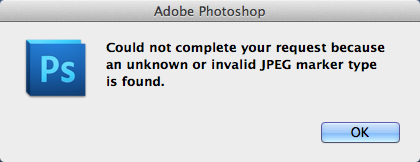
She needed to open the JPEGs and at least look at them, to be sure that they had no repairable flaws. But she could not open them.
So, following the advice of local Mac guru Justin Sharp (mentioned in yesterday’s blog), I removed the suffix from each of the offending files (using Get Info). When you attempt to remove the suffix from a file, the operating system challenges you: are you really SURE you want to do this?
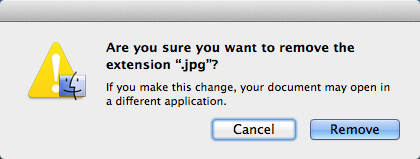
And, I did it, leaving one of the JPEGs with no icon, and no suffix sitting on the desktop.
When I double-clicked the icon, Mysterious Forces went to work on the file, creating a duplicate file with a JPEG suffix, and a correct icon showing the image of the document. This took just a few seconds.
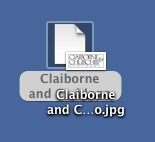
When I double-clicked on the new document, it opened in Adobe Photoshop, and was no longer corrupt. The original file is still corrupt.
I tried this with the corrupt .eps file also, removing its suffix altogether, and then double-clicked on the orphaned icon. As with the JPEG, the file opened immediately in Adobe Illustrator, intelligible and as originally intended.

I am amazed by this, and I have no idea who/what is doing the work. Is it the operating system? Is it an Apple Event? Is it some tendril of Adobe Photoshop or Illustrator? Is it Preview?
Whatever it is, it works, and it solved the problem of the corrupt files.
By the way, I was able to open one of the corrupt JPEG files in Graphic Converter, the shareware graphics application that we all seem to have in our Applications folder. The others would not open in that application. None of the corrupt files would open in Preview, Apple’s low-end image application.

Hi again. My vote is for the OS (which version gets the credit?). Stripping the extension may have told the app to ignore the metadata, which is probably what was corrupted, or might possibly have been infected. You’d be able to tell this if the metadata in the successfully-opened document was blank. On to more entries by you . . .
ECS
I was hoping I had found the answer to my problem…Alas, the fix is not working for me.
My daughter returned from a school trip and lost about 1000 photos when iPhoto crashed. Deleted the photos from the SD card only to realize the transfer did not take place.
I used Wondershare to recover the files from the SD card. We did well. There are about 100 photos that are coming back as corrupt (as above) from Photoshop. I tried the remove extension fix but it did not work. When I remove the extension, the file comes back as a “terminal” file. When I try to open it in Photoshop, the program tells me it does not recognize this type of file.
My daughter is grateful she has 90% of her photos. However as her Dad, I’m trying to fix what is broken. Any help/ideas you can offer are greatly appreciated.
Thank you.
Did you got the chance to try Stellar Phoenix JPEG Repair for Mac. it’s a DIY tool for Macs to repair corrupt JPEG files.
Hi Vishal,
Thank you for the tip on Stellar Phoenix. Looking at their web site, it appears that they have software to solve many of the common file problems, including lost files on camera memory cards. I have not had a chance to try them, but these products look promising.
Brian
Hi I have had similar problems with what appear to be corrupted jpeg files (about 3GB worth) from an SD card that I used with my Canon EOS rebel T3i camera this summer. I have tried almost all of the commercial problems including Stellar Phoenix and others. Still no luck. I also tried the trick described above and that didn’t work either. I get the terminal file as described above and nothing will open it…..
any other suggestions?
Hi Marcello,
Please send me one photo to test. I have a handful of other tools for fixing files, and one of them might work.
Brian
Brian, thanks for the info. Any chance I could also email you a file to look at? I have an old folder of damaged jpegs that I would love to get back.
Hi Mark,
I would be pleased to give it a try. Please send one or more for me to test, and I will let you know how it goes. My e-mail address is brian@thelawlers.com.
Brian
Dear Brian,
I have read your post and tip to open a file.
on another forum i have also find this very interesting post:http://www.dpreview.com/forums/post/27290822
It is a bit difficult for me but maybe you can use it.
If possible, may i send you a picture to see if you could restore it?
Thank a lot,
T
Hello Bardbat,
You are welcome to send me a photo, and I will try to open it.
Best wishes,
Brian
Brian, likewise thanks for the info.
I too am trying to open jpegs, in my case that I data restored after an inadvertent deletion of my wife’s iPhoto library, but to no avail. Any chance I could add my name to the growing list of people asking for your help, and send you a jpeg to see if you think there is any hope? (both for recovery, and my marriage?!)
Dear Nick,
Send one and let me try. I confess that I have not been too helpful of late to my readers. They seem to be more corrupt than the Finder will repair (or at least their JPEGS are more corrupt).
Brian
Dear Brian,
Both I and my marriage guidance counsellor are very grateful – jpeg incoming shortly. I hope my corruption is less severe than your recent readers’.
Best wishes
Nick
The Stellar program will not even open my corrupted jpeg. Does that mean they are too far gone 🙁
They are from my birthday and very important to me!!
Hi Calli,
I suspect that they are gone. If you have tried both the Finder trick and Stellar, there is little hope.
I’m sorry.
Brian
Brian I’m sending you a photo and please check if it can be fixed with any software
Hi George,
I tried various techniques, but it’s damaged, and it can’t be read here.
I’m sorry.
Brian
Brian thank you very much for your time,
you know I have some hundreds of corrupted photos and I sent you one just to see if you could fix it. can you tell me wich software did you use so I know what not to try?
I ‘ve already used stellar jpeg repair, picture doctor and some more and the suggested method here, with no result.
Hi Brian, I have sent you a damaged pic, just to see if it works…. Thanks a million
hello, I am new to photography and purchased a canon camera. I used an sd card and transferred the photos to my macbook air. in the finder application I can see the photos as thumbnails. but when i go to open them don’t fully show the picture. its only shows the top of the picture, almost as if it were loading. I have tried every application possible to open the photos and they all show the same. PLEASE HELP!!! THANK YOU!!
Hi Diana,
I’m not at all sure of what the problem is, but if you send me a sample image, I will take a look.
Brian
I am so frustrated! I just tried uploaded my sons 2nd bday party pictures and as i was transferring my pictures, the usb on my sd card disconnected…. I lost all the pictures! I downloaded the stellar phoenix repair and all the JPEG files were corrupt!!!!! Idk what to do, i tried the stellar phoenix JPEG repair and nothing happened! HELP MEEEEEEEE! *desperate already 🙁
Dear Izzy,
I don’t know if I can help you. I am happy to try saving one image, if you will send it to me as an e-mail attachment.
Sometimes files get damaged beyond what the simple repair I mentioned can fix.
Brian
brian@thelawlers.com
Unfortunatly this fix didn’t work for me either 🙁
Still looking for a fix to my few hundred lost photos from the first leg of my trip to Europe, (still here), As i emptied my Iphone to make space for new pics before realising a huge portion of the photos were corrupted 🙁
Any other ideas?!
Hi Stefan,
I’m sorry I didn’t respond sooner. I have been having less luck getting corrupted JPEGs to convert to good ones again using my published technique.
I don’t know what to do next, as I have run out of options, as you have.
Best wishes,
Brian P. Lawler
After an external hard drive crashed I recovered using Time Machine. A few weeks earlier I had finally scanned in 3000+ hand picked bushwalking slides to iPhoto. My life’s walking in Tasmania.
A week after the back up to an external drive I discovered that everything EXCEPT my iPhot folder came across, I lost 40 000ics,devastated.
I have Stella recovery and JPEG repair. Recovered a million images (!) but the main pics are corrupted JPEGs. Stella won’t fix them. They are large files, 3-10 meg each, so should all be ok, but I can’t find a way to fix them. If anyone has a solution, please email me to the address above. I use MAC. Thanks a heap. Len
Hi Len,
I’m sorry it took me so long to reply. I have been having less success recovering JPEGs recently. I also tried the Stella program, and had some success, but not as many as I have in previous attempts.
I regret that I do not have any additional advice for you.
Best wishes,
Brian P. Lawler
Hi Brian,
Thank you for an interesting post.
I took some work related pictures with my phone and they saved on the phone’s SD card. When I tried opening them later they my phone would not do it. Back home on my desktop mac I tried to open them but no luck. Your method described above doesn’t work either, nor does Stellar.
I would like to try other things before I tell my boss I lost the pictures 🙁
Any suggestions?
Hi Robert,
I think that the technique I wrote about on my blog no longer works. I have tried it recently, and I cannot rescue bad JPEGs any longer. I am sorry.
Best wishes,
Brian P. Lawler
I just had this problem. I was able to open the file in Preview, then save it as a .psd file. Then I was able to open it with Photoshop and I saved it as a jpg.
Hi Marc,
I’m glad it worked. I have not had much luck recently with this technique, and I fear that Apple has changed the OS.
Best wishes,
Brian P. Lawler
Hello, guys, I need help with jpg to png conversion. Do you know how to do it? IS this ok http://jpgtopng.com/?
Hi Mark,
If you have Adobe Photoshop, you can do this easily by opening a JPEG image in Photoshop. Then choose File>Save As, and change the format to PNG. If you want to change a handful of JPEGs to PNG, I would open one image, then create an Action (Window>Actions) to record the process of saving-as PNG. Actions works like a tape recorder; you click on the Record button, and Photoshop watches what you do until you hit the Stop button. Be sure to CLOSE the image before you stop recording the Action so you don’t clutter-up your screen with open photos.
To repeat the process, open any other JPEG image, and double-click on the Action you just recorded. It will do the same thing over.
(You can also include a target destination folder as part of the action; simply navigate to that folder while recording.)
If you have a whole bunch of JPEGs to convert, you can save the Action as a Droplet, which is a mini-application created by Photoshop. To create the Droplet, choose the Action you created, and Photoshop will make the Droplet to call the Action: (File>Automate>Create Droplet)
Then, from your desktop, drop any JPEG onto the Droplet (or an entire folder of images if you wish), and they will all be converted to PNG. Any non-conforming files will be ignored).
I hope this is helpful,
Brian P. Lawler