

This is the fourth in a series about how I am digitizing film from my past, and making it part of my digital archive. The start at the beginning, please click here.
I knew that once I started digitizing my film I would run into several challenges:
• Storage
• Indexing
• Searching
• Consolidating
After setting up my system for digitizing film, including making the stand, buying the macro lens (I’ve bought another that is on the way!), and then purchasing the necessary film transport mechanisms to hold various sizes of film, I had to solve the dust problem (dust never sleeps!).
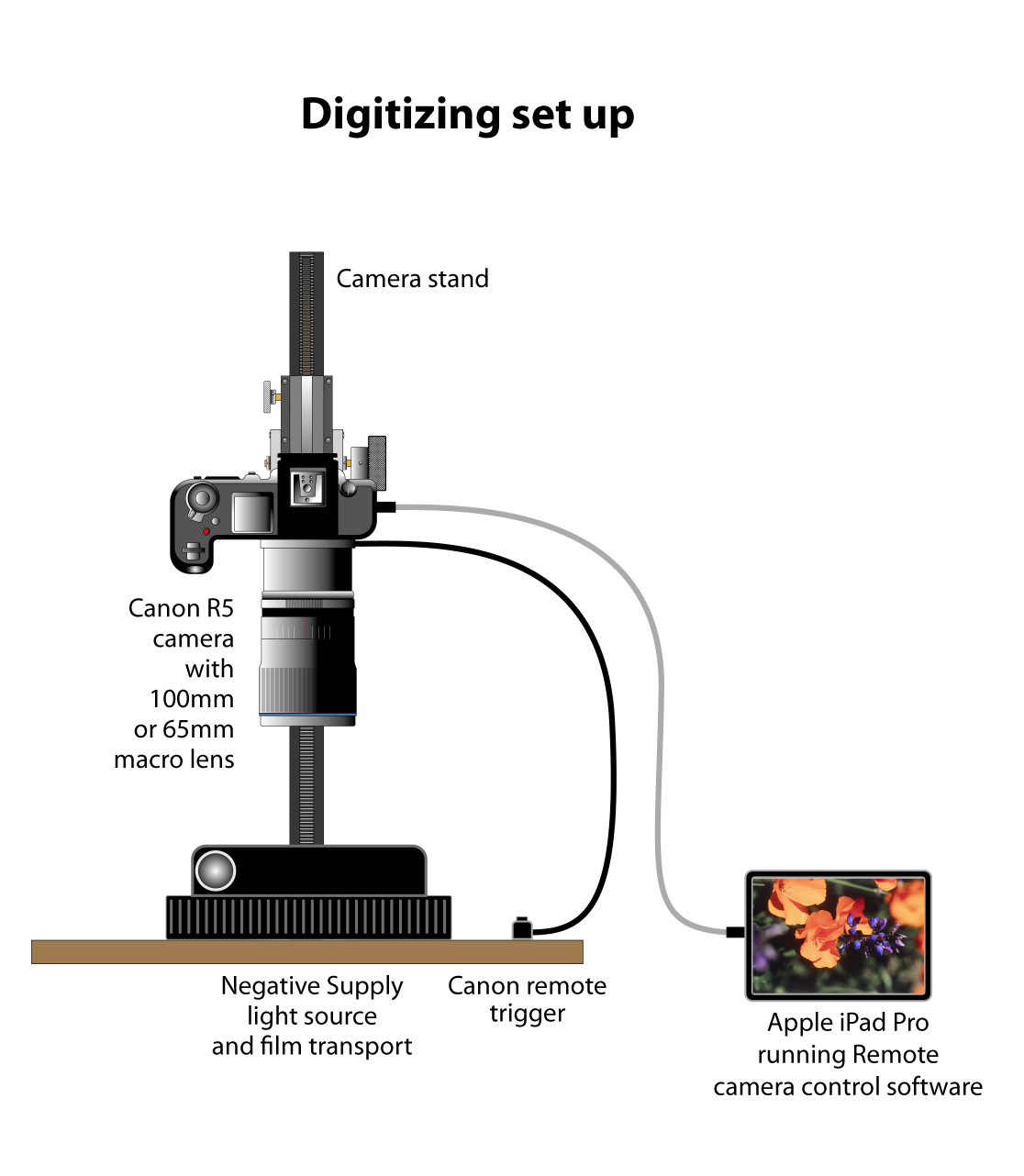
This is my complete digitizing set-up: stand, camera, lens, light source, film transport, iPad for previewing, and the associated software – NegativeLab Pro for converting negatives into positives, and an app on my iPad that allows me to see a live view on that device.
I purchased a static-eliminating brush – which works OK, and film cleaner and special lint-free pads – that work quite well. So now my “scans” of film are usually free of dust, though it still remains a problem.
In this post I am going to refer to the process of re-photographing or digitizing film as “scanning.” I am also going to refer to the process as “digitizing.” Scanning is not the correct term for the process, but please bear with me.
I scanned two of my long rolls of 35mm negative film, and converted the resulting images – about 340 total – using Negative Lab Pro software – which works really well – and then for fun, I created a time-lapse movie from the resulting still photos – which didn’t work very well at all. The problem there is that the individual frames were made at 19-minute intervals, and the lighting in the hangar changed dramatically depending on the position of work lights, sunlight incursion, and occasionally the hangar door being opened.
I decided to put the long-roll time-lapse work on a back burner and concentrate on digitizing my still photos, starting with whatever box I find next in my garage.
I needed a method for storing the actual film after digitizing. I looked around at B&H and other suppliers and discovered that storing film in “archival” containers is stunningly expensive. I apologize to archivists when I say this, but that’s too expensive for me!
Instead, I have chosen to put strips of film, after scanning into regular paper envelopes. Regular – white – paper is bleached in manufacture, and acids that might damage film are removed in the process. I see the risk of acid incursion on negatives and transparencies to be very small, and I am willing to risk it. For the storage of 35mm mounted slides, I am going to use corrugated boxes that fit about 200 slides per carton. Kraft paper, from which corrugated boxes are made, is definitely not archival. But, the slides are protected from direct contact with the corrugated material by their paper or plastic mounts, and that’s OK with me.

This is the Adobe InDesign document to print the serial-numbered #10 envelopes for putting the film after it is digitized.
I had my students at Cal Poly print 500 plain white envelopes for film storage. I put information on the front of those envelopes, and put serial numbers on each envelope using the variable-data functions in Adobe InDesign. Those numbers form the storage key to my archive, and will provide an index number that gets entered into my…
Database – I wanted to renew my subscription to FileMaker Pro, but decided that it’s too sophisticated and way too expensive for this project. It also requires an on-going monthly payment, and I am not willing to commit myself and my descendants to that. So, instead, I bought a Mac database called iDatabase for $40.00. It is good; it gets reasonable ratings. And, after using it for two days, I can attest to its ease of use, simple design procedures, and basic functionality. iDatabase allows me to copy the information on the front of my storage envelopes, and then enter all the information that I have about the photos into the database, which I can later search and find a photo by its description, date, or content, as long as I enter that information into the database.
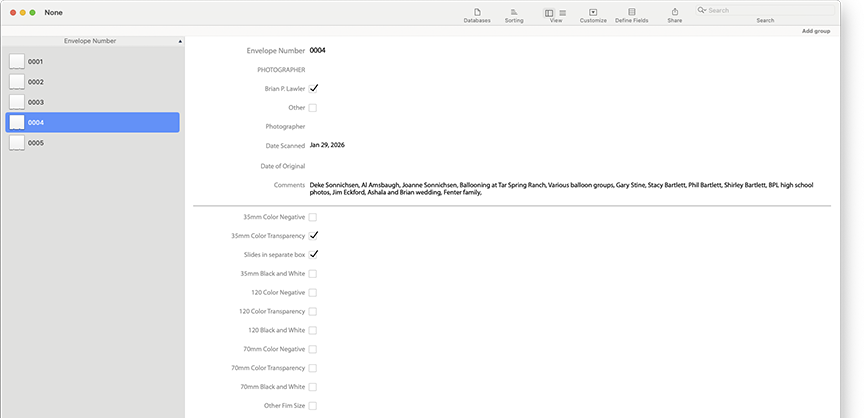
This is my custom iDatabase form for these envelopes. All of the information from the face of each envelope is entered here, and is thus searchable. I added a checkbox to indicate when the contents of an envelope have been stored in a corrugated carton.
After scanning a few hundred mounted 35mm slides, I decided to enter the information on the face of one of the numbered envelopes, but then put a sticker on the envelope indicating that the actual slides are stored in a corrugated carton with the same number on the front of the box. When the database refers a user to a specific envelope, that envelope will direct that person to get the slides from a carton with the same number. It should work, and will take up much less space than the many hundreds of binders I have with clear plastic slide holders in them.

These are the Corrugated cartons I bought to hold mounted 35mm slides. Each one can hold about 150 slides. The stickers indicate that they contain slides, and the Envelope number, that refers back to the archiving envelopes. The same data from the envelopes is entered into the database.
So, the system is in place. I have the process working, and I am now entering information on Envelope 0004. I have scanned 35mm color negative film, color transparencies and mounted color transparencies (slides). I have entered information into the database and tested it for searching. It seems to work perfectly well. Long-term use will tell, of course.
I bought a pack of small stickers on which I printed “SLIDES” to put on the face of envelopes whose contents are in the storage cartons.
Now I will begin in earnest to scan images from film, store the film strips in serial-numbered envelopes, enter the information about them into the database, and then put the material into banker’s boxes in my garage. It’s far from perfect, but it’s a system, and I think it will work pretty well. If it needs adjustment, I can change my process without much trouble.
By doing this, not only will I have very high quality digital reproductions of my film, but I will have reduced overall storage volume by consolidation, and will have a searchable database of the images in storage. With these elements in place, I should be able to save space, save time, and save the images as digital images of what was only available as film before. Film that I could never find. I am confident that it will give me access to tens of thousands of photos I took between 1967, when I became a serious photographer, and today.
To read the next post on this topic, please click here.
